Develop Automation
Overview
In this guide, you will create a simple automation that prints "Hello World".
Prerequisites
Before you begin, make sure you have the following:
- Visual Studio Code: Install Visual Studio Code if you don't have it already.
- WSO2 Integrator: BI Extension: Install the WSO2 Integrator: BI extension. Refer to Install WSO2 Integrator: BI for detailed instructions.
Step 1: Develop automation in WSO2 Integrator: BI
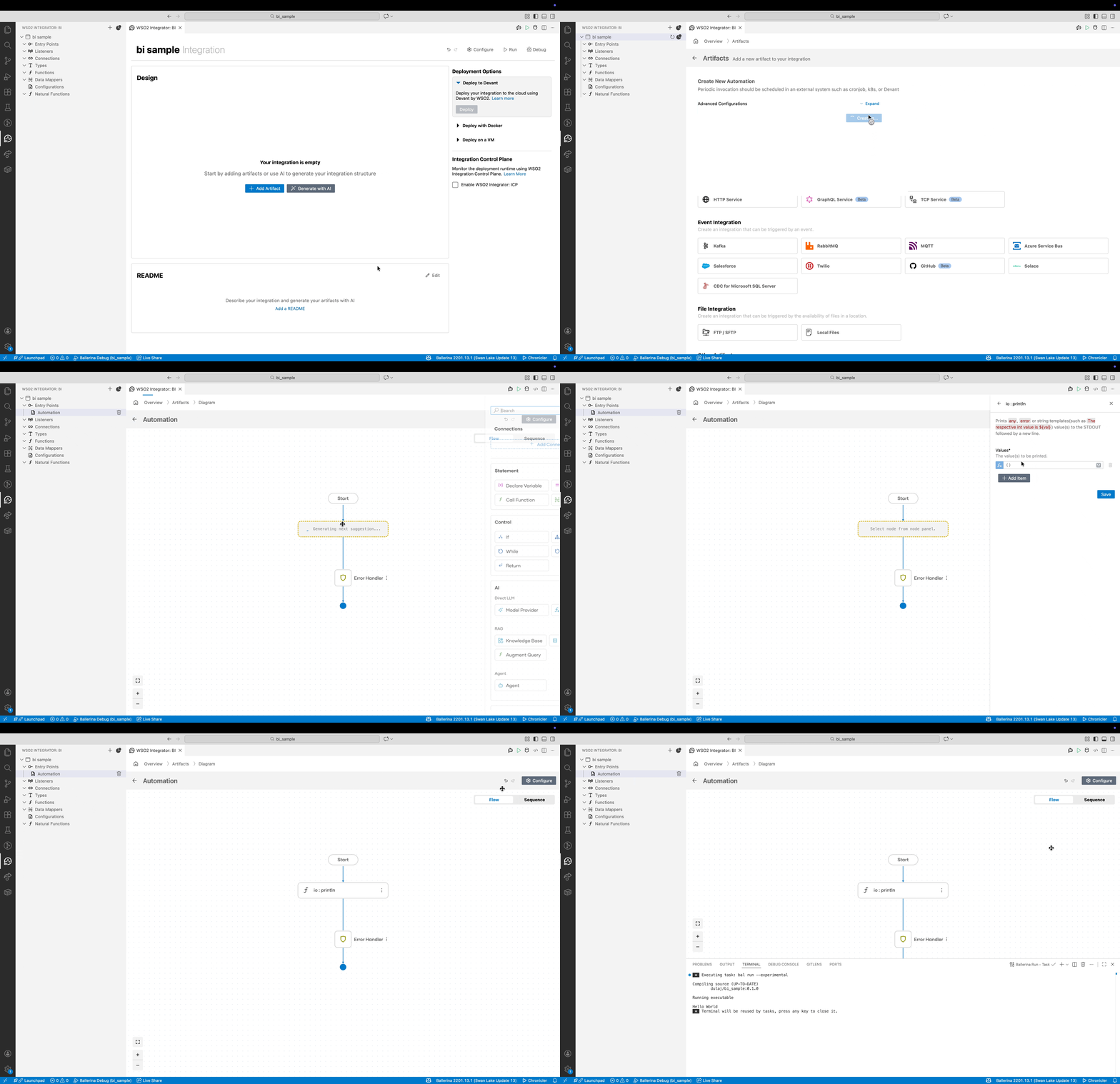
- In WSO2 Integrator: BI design view, click Add Artifact.
- Select Automation from the Constructs menu.
- Click Create to create an automation. This directs you to the automation diagram view.
- Click + after the Start node to open the node panel.
- Select Call Function and select println.
- Click + Add Another Value, type
"Hello World"and click Save.
Step 2: Run automation in WSO2 Integrator: BI
-
Click Run in the top right corner to run the automation. This compiles the automation and runs it in the embedded Ballerina runtime.